22 May 2026
Is Your EV Charger Leaking Your Wi-Fi Password?
By Greg Tereszczyn, Founder & Principal Consultant
It can be. Some connected home EV chargers write your Wi-Fi password to a plain-text log on the device, ship with default passwords printed in the manual, and carry admin accounts their owners are never told about. The fix takes about an hour: change every default password, put the charger on its own guest or IoT network, and keep its firmware up to date.
Households in Australia and around the world are installing Level 2 chargers and joining them to home Wi-Fi for app control and scheduled charging. Consumer IoT devices routinely ship with security practices no business would accept, and EV chargers are no exception. The weaknesses below are patterns security practitioners keep finding across connected charging hardware.
What security flaws do connected EV chargers have?
Your Wi-Fi password in a plain-text log
When some chargers join your Wi-Fi, their setup script passes the credentials as plain-text command-line arguments, and the device writes them to a log file at a predictable path. Anyone with local access to the charger (the installer, a service technician, or someone with a few minutes alone with it) can read your Wi-Fi password, with no decryption needed. This is a well-documented weakness, CWE-312: Cleartext Storage of Sensitive Information, and one of the most avoidable.
 The device setup script passes Wi-Fi credentials as command-line arguments, writing them to a readable log file on the device.
Default passwords printed in the manual
Many chargers create their own Wi-Fi hotspot for setup, protected by a password printed in the installation guide: the same password on every unit sold. The web admin page, usually at a fixed address and port, ships with default credentials documented in the same manual. Some guides then suggest a specific replacement password, which is as predictable as the default it replaces.
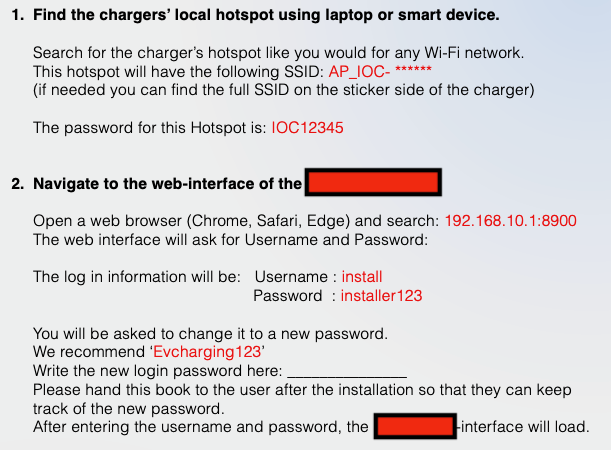 The installation guide documents the default hotspot password, admin credentials, and recommends a specific replacement, all in the same document handed to every customer.
Admin accounts you were never told about
Some models ship with admin accounts that the customer's installation guide never mentions, while their details are published in resources anyone can find online. A basic internet search is enough to find valid credentials for the charger's admin panel. This was the most alarming finding: you cannot change a password you do not know exists, or watch an account you cannot see.
Why does a charger's security matter for your home network?
Your home Wi-Fi connects everything else: phones, laptops, cameras, smart home devices and, often, work devices. A poorly secured charger is a stepping stone to all of them.
- An installer or technician could read your Wi-Fi password from the device logs, intentionally or not.
- Anyone who joins the charger's setup hotspot with the published password can try to log in to its admin panel.
- An attacker with admin access can change charging schedules, disable the unit, or use the charger as a foothold to move into the rest of your network.
How do you secure a home EV charger?
These steps apply to any brand, before and after installation:
- Change every default password. Never use a password suggested in the guide. Generate a strong, unique one in a password manager, and change any password the installer set for you.
- Put the charger on a separate network. Most modern routers offer a guest network or IoT network. Isolating the charger means a compromised unit cannot reach your phones and laptops. This is the single most effective step available at home.
- Review the companion app's permissions. A charging app rarely needs your contacts, microphone or location history. Revoke anything unrelated to charging.
- Update the firmware. Log in to the admin panel and confirm it runs the latest version; many devices receive security fixes that owners never apply.
- Ask your installer about credentials. A professional installer should change every default before leaving. If yours did not, do it now.
How can installers and IT teams check a charger before deployment?
Check a connected device before it joins any network, home or business. Rapid7 InsightVM (formerly Nexpose) can scan the device's IP address for open ports, exposed services, weak credentials and CVEs in its firmware or software in a few minutes, and its risk scoring helps prioritise fixes across a fleet. The free NIST National Vulnerability Database shows whether a model or firmware version has known CVEs before you buy or deploy it. Shodan shows whether a management page has been exposed to the internet, a common result of opening router ports during installation. They will not catch everything, but together they consistently surface the most exploited problems: unpatched software, default credentials and needlessly exposed services. A charger is also exactly the kind of quiet device a central scan misses, which is why where you place a scanner decides what it sees.
TERESEC is a Rapid7 PACT Registered Partner. We help deploy, configure and run vulnerability management programmes on the Rapid7 platform.
Is there an Australian law on smart device security?
Yes, for new devices. Since 4 March 2026, the Cyber Security (Security Standards for Smart Devices) Rules 2025 require most internet-connected devices made for household use to ship without universal default passwords, to publish a way to report security issues, and to state how long they will receive security updates (Home Affairs). The rules exclude computers, phones, tablets, therapeutic goods and vehicles, and they cover only devices manufactured from that date, so a charger already on your wall may predate them. The European baseline for consumer IoT, ETSI EN 303 645, sets similar requirements. Until older stock is gone, owners, installers and IT teams still carry the job of basic hygiene at installation.
The same patterns appear in cameras, routers, door locks and building systems: hard-coded credentials, unencrypted secrets and manuals that publish the attack path. If your business runs connected devices you have never assessed, the $399 IT Security Review is a fixed-price place to start, or contact TERESEC about an IoT or IT/OT security assessment.
Updated 4 October 2026: rewritten answer-first, with Australia's smart device security standard, in force since 4 March 2026.
About the author
Greg Tereszczyn
Greg Tereszczyn is the founder and principal consultant of TERESEC, an Australian cyber security consultancy for small and medium business. He turns the Essential Eight, the ISM, ISO/IEC 27001, NIST CSF and IEC 62443 into plain-English advice a business can act on.